Projects
Some of my best work.
Sifter
A self-hosted alternative to GPTZero and Quillbot for detecting AI-generated text
About
GPTZero charges a subscription. Quillbot charges a subscription. Both are running the same basic idea: take some text, run it through a classifier, return a probability that it was written by a language model. Sifter does the same thing, runs on my own hardware, costs nothing per query, and sends your text nowhere.
The accuracy is comparable to the paid tools — not because I have their engineering budget, but because the underlying problem is fundamentally the same regardless of who’s solving it. All of these tools will produce false positives and false negatives. The difference is that Sifter is self-hostable, open source, and done in about seven hours.
How It Works
The Core Pipeline
Text comes in through a form on the frontend. The backend — a Phoenix application written in Elixir — takes that text and breaks it into chunks. Each chunk is sent in parallel through an AI classification model, which returns a decimal value between 0 and 1 representing the probability that the chunk was AI-generated. The backend aggregates these into an overall score and returns both the per-chunk results and the total to the frontend.
The frontend then uses those per-chunk scores to highlight the original text. The highlight intensity scales dynamically with the score — a chunk with a 100% AI probability gets 50% highlight opacity, a chunk at 50% gets 25%, and so on. The gradient makes it easy to see at a glance which parts of a document are flagging versus which parts look human-written, rather than just getting a single number that tells you nothing about where the AI-written content actually is.
Why Chunks?
Running the entire text through a classifier as a single input loses spatial information — you can tell that something in the text is AI-generated, but not where. Chunking preserves that, and it also means the model is working on shorter, more manageable inputs rather than arbitrarily long documents.
The chunk-level results also improve the overall score’s reliability. A document that’s half human and half AI-written will return a more honest aggregate than one where the classifier tries to make sense of the whole thing at once.
Parallelism
The chunks are processed in parallel using Elixir’s concurrency primitives. This was actually one of the more impactful optimisations, especially on ARM hardware (the Oracle Cloud VM runs on ARM64). ARM chips tend to have lower single-core clock speeds but many more cores than their x86 equivalents — sequential chunk processing barely used the available hardware, while parallel processing scales naturally with core count. The latency improvement was significant: down from a couple of seconds to around one.
Model Selection
Finding a model that actually worked accurately was harder than expected. Most publicly available AI text classification models perform poorly in practice — they were either trained on narrow datasets, overfit to specific LLMs, or just not reliable enough to be useful. The first model tested produced inaccurate results and had to be replaced with a dedicated classification model that performs substantially better. The model handles prose well; it doesn’t currently handle code.
The Build
Proof of Concept
The first working version was a Python script that could take text and return a classification. Once that was confirmed to be producing sensible results with a model that was actually accurate, the decision was made to migrate the inference logic into an Elixir/Phoenix backend. The reasoning was the same as across the other projects — parallel processing in Elixir is ergonomic and fast, and the BEAM VM handles concurrent inference requests without the overhead of a Python web server.
The initial frontend was AI-generated — a basic input box and a result display, good enough to prove the concept worked end-to-end but not something to ship publicly.
Frontend Redesign
The vibe-coded frontend was replaced with a hand-built one during the longest single session of the project (just under three hours). The redesign introduced:
- Dark mode, with a bug worth noting: switching back from dark mode was only clearing
localStoragewithout removing thedata-themeattribute from the DOM, so the theme persisted visually even after the user toggled it. Fixed once the actual cause was tracked down. - The dynamic text highlighting, which required cross-referencing the chunk results against their position in the original text and applying opacity-scaled highlights correctly.
- General visual polish to make it feel like something worth using rather than a proof of concept.
Containerisation & CI/CD
The app runs as a Docker container. The Dockerfile uses a two-stage build — compile the Elixir release in a builder image, copy the binary into a minimal runner — and includes a pip-style mount cache for the mix dependency download step so rebuilds don’t re-fetch packages unnecessarily. There’s also a model cache baked into the container setup so that restarting the container doesn’t require re-downloading the classification model over the network every time.
A docker-compose.yml is included for local development and self-hosting. A GitHub Actions workflow handles building and publishing the OCI image, with caching in the workflow itself to speed up CI builds. The image is published as :latest-arm targeting the ARM64 Oracle VM.
Cloudflare Tunnel proxies the container to a public URL without needing to open any inbound ports on the VM — the tunnel handles the connection, and a CNAME record points the subdomain at it.
Accuracy & Honesty
AI text detection is a genuinely hard problem, and no tool solves it completely. LLMs are trained to produce fluent, natural-sounding text — by design, that overlaps with how humans write. Any classifier operating on surface-level text features is working against that.
Sifter is honest about this. False positives happen. False negatives happen. The paid tools are in the same position. The advantage of Sifter isn’t that it’s more accurate — it’s that it’s self-hostable, runs entirely locally, and doesn’t send your text to a third-party server. For anyone who cares about that (educators handling student submissions, internal document review, anyone working with sensitive text), that matters.
The current version doesn’t handle code. Code has different statistical properties from prose and would require either a separate model or fine-tuning on code-specific data to be reliable.
Self-Hosting
Pull the image or clone the repo. The only required configuration is a SECRET_KEY_BASE environment variable for Phoenix session signing — the provided docker-compose.yml includes a pre-generated one to get started quickly.
docker compose upThat’s it. The model downloads on first run and caches locally from there.
Tech Stack
- Backend — Elixir, Phoenix
- Frontend — HTML, CSS, JavaScript (Tailwind)
- Model — HuggingFace classification model (self-hosted, runs in-process)
- Infrastructure — Oracle Cloud ARM64 VM, Docker, Cloudflare Tunnel, GitHub Actions
Amur
A simple OAuth library for Elixir Plug applications
About
Amur is an Elixir library that adds OAuth to any Plug-based application in about ten lines of configuration. It handles the full callback flow and normalises user data across providers, so you get consistent results regardless of which OAuth provider the user authenticated with.
It doesn’t require Phoenix. If your app uses Plug, it works.
Why I Built This
Adding OAuth to an Elixir app involves a lot of the same boilerplate every time: set up a callback route, exchange the code for a token, fetch the user profile, normalise the fields across providers because GitHub calls it login and Google calls it email, handle failures, store something in the session. Every project that needs login needs all of this.
By the time I’d implemented it a second time I decided to pull it into a standalone library so I wouldn’t have to do it a third time. Amur is the result of that.
How It Works
Configuration
You configure Amur once in your application config:
config :amur,
  base_url: "http://localhost:4000",
  providers: [
    github: [
      client_id: System.fetch_env!("GITHUB_CLIENT_ID"),
      client_secret: System.fetch_env!("GITHUB_CLIENT_SECRET")
    ]
  ],
  on_success: &MyApp.AuthController.on_success/3,
  on_failure: &MyApp.AuthController.on_failure/2
Providers are a keyword list, so adding a second provider is a matter of appending another entry. Credentials are pulled from environment variables via System.fetch_env!/1, which raises at boot if a required variable is missing — better to fail loudly at startup than silently at runtime when a user tries to log in.
Mounting the Router
Amur ships with its own Amur.Router that you forward to from your application router:
scope "/auth" do
  pipe_through :browser
  forward "/", Amur.Router
end
This mounts three endpoints under whatever path you choose:
GET /auth/:provider— kicks off the OAuth flow, redirecting the user to the provider’s authorisation pageGET /auth/:provider/callback— handles the redirect back from the provider, exchanges the code for a token, fetches the user profile, and calls your success or failure handlerGET /auth/logout— clears Amur’s stored session parameters
The :provider segment is dynamic, so adding support for a new provider in config automatically gives you a working route for it without touching the router.
One Phoenix-specific note: if you use forward inside a named scope, Phoenix rewrites the module path to YourAppWeb.Amur.Router, which doesn’t exist. The fix is alias: false on the scope. Took me longer to figure out than it should have.
Handling Results
You supply two callback functions in config — one for success, one for failure. These are plain functions that receive a conn and either the normalised user map or the failure reason:
def on_success(conn, provider, user) do
  conn
  |> put_flash(:info, "Logged in as #{user.email}")
  |> redirect(to: "/")
end

def on_failure(conn, reason) do
  conn
  |> put_flash(:error, "Authentication failed")
  |> redirect(to: "/login")
end
The user map is normalised across providers — you get consistent field names regardless of which provider was used. The provider atom tells you which one authenticated the user if you need to handle them differently.
Design Decisions
Plug-only, no Phoenix dependency. Phoenix is built on Plug, so Amur works with Phoenix apps — but requiring Phoenix in the library would lock out anyone using Plug directly, which is a common pattern for lightweight APIs and internal tools. Keeping the dependency minimal keeps the library more useful.
Callbacks as function references. Rather than defining a behaviour that consumers implement, Amur takes success and failure handlers as plain function references in config. This means less boilerplate on the consumer side — no need to define a module that implements a specific behaviour, just point at any two functions with the right arity.
Provider normalisation. Different OAuth providers return user data in different shapes. GitHub returns a login, Google returns an email and a name, others vary. Amur normalises these into a consistent map so the application code doesn’t need to handle provider-specific field names. This is one of the less glamorous parts of OAuth that every implementation ends up solving separately.
Installation
Add Amur to your mix.exs:
def deps do
  [
    {:amur, "~> 0.1.0"}
  ]
end
Then follow the setup steps above to configure providers and mount the router.
Tech
- Language — Elixir
- Depends on — Plug (no Phoenix required)
- Distribution — Hex.pm

FTPDB
An IMDb-style database for Flavortown projects, users, and devlogs
About
Flavortown is a platform where people log hours working on personal projects and share devlogs as they go. It’s a great concept, but its native search and browsing experience is limited — you can’t easily filter by activity, sort by popularity, or quickly look up what someone has been building. FTPDB fixes that.
FTPDB (FlavorTown Project Database) is an IMDb-style interface that scrapes the entirety of Flavortown, stores it in a custom Postgres database, and serves it through a fast, searchable frontend built in Elixir and Phoenix LiveView. It has a public API, markdown-rendered devlog pages, user profiles, a ranking algorithm, and sub-millisecond response times for most queries.
Some Flavortown admins have ended up using it as their primary way to look up projects. That was never the original goal, but it’s a reasonable sign that the problem being solved is real.
The Build
Starting from Scratch: Scraping Flavortown
The first challenge was getting the data. Flavortown exposes an API, but it wasn’t designed for bulk access — so the initial pass involved writing a Python scraper to pull in every project, user, and devlog and load it into Supabase.
This sounds straightforward until it isn’t. A few things went wrong immediately:
Missing devlog project IDs. A chunk of devlogs in the API response didn’t include their parent project ID. The bulk /devlogs endpoint wasn’t reliable enough to reconcile these on its own, so a secondary scraping pass was needed — hitting /projects/{id} and /devlogs/{id} individually for every affected record. This meant the scraper had to be smart enough to detect the gaps, queue the affected IDs, and fill them back in. It also hit rate limits hard during this pass, which slowed things down considerably.
Images. The original plan was to host images locally. That fell apart quickly — there simply isn’t enough disk space to store banners for every project on Flavortown. The solution was to reference images directly from Flavortown’s CDN rather than re-hosting them. This works, but it means image load times are at the mercy of Flavortown’s servers, not mine.
Concurrency for banner scraping. Once image URLs were being fetched separately, banner scraping became a bottleneck. Running 40 concurrent workers for the banner fetch pass brought this down to an acceptable time. The scraper also supports a full rescrape of banners — not just filling in null values — so it can be re-run from scratch if needed.
All of this is managed through a TUI (terminal user interface) that ties together the various scraping scripts into a single control panel, rather than having to remember which Python file does what.
The Live Scraper
A one-time import only gets you so far. To keep data current, a live scraper runs every 30 seconds against the /projects and /devlogs Flavortown API endpoints and diffs the results against what’s already in the database.
This is where the upstream API becomes a constraint rather than just an inconvenience. The Flavortown API doesn’t always return up-to-date data — hours and stats in particular lag behind the actual state of a user’s account. This isn’t something that can be fixed from the outside; the note on the FTPDB homepage (“Hours & Stats MAY not be accurate due to the FT API not working as intended”) is there because of this, not because of any bug in the scraper. The scraper does what it can with what it gets.
Backend: Elixir & Phoenix
The web application is built entirely in Elixir using the Phoenix LiveView framework. The choice of Elixir here is the same reasoning as the URL shortener — the BEAM VM handles concurrent, independent requests extremely well, and LiveView means the interactive parts of the UI (search, shuffle, theme switching) work without writing a separate JavaScript frontend.
All database logic lives in DB.ex, split into sections for misc, projects, users, and devlogs. This separation makes the file navigable as the number of functions grew over time, and it made the refactoring passes easier — there were several of these as the codebase matured.
Supabase RPCs. Several operations that would be prone to race conditions or slow if done in application code are instead handled by stored procedures (RPCs) called directly through Supabase. Random project selection is a good example: rather than pulling a large set and shuffling in Elixir, the RPC handles true randomness at the database level. Projects with default banners are filtered out server-side too, since these tend to be starter templates with no meaningful content.
Ranking. Hot projects are ranked by an algorithm that weighs recent activity, total likes, and time logged. Fan favourites weight purely on likes. Top this week filters by activity within the current week. These are all exposed as separate API endpoints and used by different sections of the frontend.
Slack integration. A /suggestions page sends user-submitted feedback directly to my Slack via a bot. It’s a simple webhook call but it means suggestions actually reach me rather than disappearing into a form.
Caching
Random project and devlog loading initially took around 5 seconds. That’s not acceptable for something that’s supposed to feel instant.
The fix was Cachex, an Elixir in-memory caching library, combined with a rethought selection strategy:
- Pick a random index from 1 to the total number of projects/devlogs
- Use that index as a cache key
- On a cache miss, fetch from Supabase and populate the cache
- On a cache hit, return immediately
The key insight was that “random” doesn’t need to mean “uncached”. A random index into a cached set is still random from the user’s perspective, and it means the hot path doesn’t need to touch the database at all after the first request. This brought random load times from ~5 seconds down to around 40ms. The same logic applies to both random projects and random devlogs.
Cloudflare provides an additional edge caching layer on top of this, so even the Phoenix app doesn’t need to be hit for cacheable pages.
Frontend
The frontend is Phoenix LiveView with .html.heex templates — no separate JavaScript framework. Early iterations had CSS scattered across individual component files, which became a maintenance problem as the number of pages grew. A consolidation pass moved everything into a single stylesheet, which made component reuse straightforward and noticeably shrank the codebase.
Search uses relevance ranking that accounts for hotness and like count, so you don’t just get alphabetical results. It’s also case-insensitive and excludes deleted projects from results, both of which sound obvious but had to be explicitly added.
Project pages show the project banner, total time logged, like count, the full list of devlogs, and a link to the project’s page on Flavortown itself. Devlogs render full markdown, including images — this was added after noticing that a lot of devlogs include formatted text and screenshots that looked broken as plain text.
User pages show profile picture, display name, Slack ID (useful for finding someone quickly), total time across all projects, and a grid of their projects.
Random browsing. There’s a /projects page with a shuffle button that serves a random selection from the cache. Same for devlogs. These existed before the caching work but were too slow to be useful — at 40ms they’re actually fun to use.
Theme switching. Two colour themes, toggled without a page reload.
Scroll arrows. The default scrollbar on tiled project views was hard to spot. Arrow buttons were added as an explicit navigation affordance.
Error handling. If a project has been deleted but a user still exists, returning nil to the frontend used to cause a crash. The backend now handles this gracefully and returns the user’s projects regardless.
The Logo
The logo was made by @SeradedStripes, not me. It’s better than anything I would have produced. There’s a favicon version too.
API & Docs
FTPDB exposes a public API. The docs are hosted on Scalar rather than within the app itself — Scalar gives a much nicer presentation than a raw OpenAPI YAML file served locally. The OpenAPI schema was rebuilt from scratch based on the original spec and is kept in sync as endpoints change.
Performance
| Operation | Before | After |
|---|---|---|
| Random project load | ~5s | ~40ms |
| Random devlog load | ~5s | ~40ms |
| Response time (cached) | — | ~150µs |
What I Learned
Scraping in bulk is a negotiation with the upstream API. Rate limits, missing fields, and stale data aren’t edge cases — they’re the norm. The scraper needed to be robust enough to handle partial failures, queue retries, and reconcile gaps rather than assuming the first pass would be complete.
Caching strategy matters more than raw database speed. The move from 5 seconds to 40ms wasn’t about switching databases or optimising queries — it was about rethinking when and how data is fetched at all. A well-designed cache makes a Postgres round-trip feel local.
Consolidating CSS early would have saved time. The refactor to a single stylesheet happened after a dozen pages had their own styles. Doing it sooner would have avoided duplicate work and made the UI more consistent from the start.
Community adoption changes how you prioritise. Once Flavortown admins started using the search bar, fixing bugs in search accuracy moved up the list. Building for real users — even a small number — is different from building for yourself.
Tech Stack
- Web — Elixir, Phoenix LiveView
- Scraper — Python (containerised, with TUI)
- Database — Supabase (Postgres)
- Caching — Cachex (application-level), Cloudflare (edge)
- API Docs — Scalar
- Infrastructure — Oracle Cloud VM, Docker, GitHub Actions

About
Huai is a self-hosted document converter that takes almost any file format and outputs clean, readable Markdown. Drop in a PDF, a Word document, a spreadsheet, a PowerPoint, an image, an audio file, a video — it handles all of them and hands back structured Markdown you can actually use.
The motivation is the same one that comes up repeatedly when working with documents programmatically: files arrive in every format imaginable, but the text inside them is what you actually want. Extracting that text cleanly, without the proprietary formatting cruft, is tedious to do yourself for every format. Huai does it in one place.
Supported Formats
Huai handles a wide range of input types:
- Documents — PDF, DOCX, PPTX, XLSX
- Images — standard formats; content is extracted via OCR or vision model
- Audio — transcribed to text, then formatted as Markdown
- Video — audio track extracted and transcribed
- And more — the converter is not limited to a fixed list
The output in every case is clean Markdown: headings preserved from document structure, tables rendered as Markdown tables, lists as lists, and body text as paragraphs. No HTML soup, no binary garbage — just the content.
How It Works
Upload & Processing
The frontend is Phoenix LiveView — a drag-and-drop zone that accepts any file type. Once a file is dropped or selected, it’s uploaded to the server and handed off to the conversion pipeline.
The backend determines the file type and routes it to the appropriate conversion strategy. For structured documents like DOCX and PPTX, the structure is parsed directly and mapped to Markdown equivalents. For PDFs, text is extracted from the PDF layer where available. For image content (either image files or image-heavy PDFs), a vision model handles text extraction. For audio and video, a transcription model processes the audio track.
Why Phoenix LiveView
The LiveView architecture is a good fit here for the same reason it works well for any file-processing interface: the connection stays open between the browser and the server while the conversion runs, so progress can be streamed back to the frontend without polling or websocket management code on the client side. When the conversion finishes, the result appears in the same page without a reload.
Infrastructure
Huai runs as a Docker container on an Oracle Cloud ARM64 VM behind a Cloudflare Tunnel, the same deployment pattern used across the other projects. The two-stage Dockerfile compiles the Elixir release in a builder image and copies the binary into a minimal runner, keeping the production image small with no compiler toolchain included. GitHub Actions handles CI and image publishing.
Tech Stack
- Backend — Elixir, Phoenix LiveView
- Frontend — Phoenix LiveView, Tailwind CSS
- Infrastructure — Oracle Cloud ARM64 VM, Docker, Cloudflare Tunnel, GitHub Actions
About
I built this as a personal URL shortener — something I actually wanted to use rather than rely on third-party services. What started as a weekend Python script turned into a full rewrite in Elixir, a proper frontend, a Docker-based deployment pipeline, and a production system running on my own hardware.
The short version: you paste a URL in, you get a short code back. Click the code, you get redirected. Simple concept, surprisingly interesting to build properly.
The Journey
Starting with Python
The first version was a FastAPI application backed by a flat JSON file. Hashing used zlib.crc32 converted to a Base36 string (0–9, a–z) to produce short alphanumeric codes. It worked on localhost, and that was enough to prove the concept.
From there the JSON file was swapped out for Supabase, making the API stateless and ready for deployment. The app was containerised with Docker — with a pip mount cache during the build stage (--mount=type=cache,target=/root/.cache/pip) to avoid re-downloading dependencies on every change.
Moving to Elixir
After the Python version was working end-to-end, I migrated the backend to Elixir using the Phoenix framework. The reason was straightforward: the BEAM VM is purpose-built for lots of small, independent, concurrent requests — which is exactly what URL redirects are. Python gets the job done, but Elixir’s pattern matching on results ({:ok, result} vs {:error, reason}) makes error handling more robust by construction.
I initially used Ecto for database access, but since all persistence goes through Supabase’s REST API anyway, it was unnecessary overhead. I stripped it out in favour of the supabase-potion library and direct PostgREST calls, which simplified the codebase considerably.
Caching
Database calls to Supabase added ~50ms of latency per redirect — fine for encoding, unacceptable for redirects that should feel instant. I integrated Cachex with a prewarm strategy:
- On lookup, check Cachex first.
- Cache hit → return immediately.
- Cache miss → query Supabase, populate the cache, return the result.
I also noticed that requests were routing to Supabase via Cloudflare rather than the local machine address — switching to the internal address, combined with Cachex, dropped redirect latency from ~5ms to around 150 microseconds.
Click tracking is handled by a Postgres stored procedure (click_counter) called via RPC, which atomically increments the count and avoids any read-modify-write race conditions. Writes are done asynchronously so they don’t sit in the hot path of the redirect.
Frontend
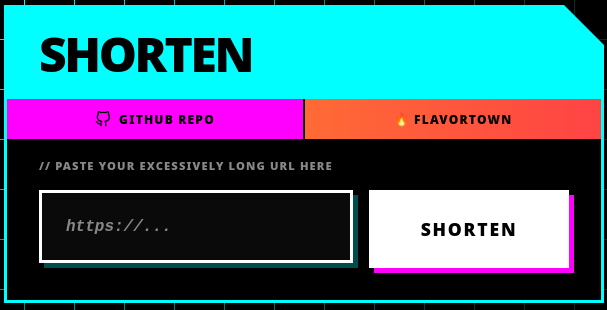
The UI went through a few iterations — plain HTML form, then JavaScript with a fetch call, then a proper redesign. The current style is intentionally harsh:
- Pure black background (
#000000) - Neon cyan, magenta, and yellow accents
- Hard edges, no border radius
- Offset solid-colour drop shadows
- Monospace fonts throughout
Shortened links copy to clipboard on click via navigator.clipboard.writeText(), with brief “Copied!” feedback. A config.js file externalises the API base URL so switching between local and production doesn’t require hunting through source files.
URL validation runs before submission: a HEAD request (with a 5-second timeout) pings the target. If it’s unreachable, the user is asked whether they want to store it as a plain text message instead — useful for internal/LAN URLs. Messages are tagged with ~ in the database and handled differently on retrieval.
Deployment
The backend and frontend are consolidated into a single Phoenix application (exapi/) and deployed on a free Oracle Cloud VM. GitHub Actions handles continuous deployment on push to main.
The Docker image for Elixir uses a two-stage build: compile the release inside a builder image, copy the binary into a minimal runner image. The result is a small production container with no compiler toolchain included. A separate GitHub Actions workflow uses docker buildx to build simultaneously for linux/amd64 and linux/arm64, pushing a multi-arch manifest to the GitHub Container Registry — so it runs on both x86 servers and the ARM-based Oracle instance without any manual targeting.
Cloudflare sits in front of the frontend. Since the site behaves as a single-page app, a Cloudflare Function (functions/[[path]].js) intercepts requests. The key detail: fetch inside a Cloudflare Worker follows redirects transparently by default, which would silently consume the 302 before the browser ever saw it. Setting redirect: "manual" lets the worker capture and forward the 302 to the client so the actual redirect happens in the user’s browser.
Performance
| Operation | Latency |
|---|---|
| URL encoding (new) | ~15ms |
| Redirect (cache hit) | ~150µs |
Tech Stack
- Backend — Elixir, Phoenix
- Database — Supabase (Postgres)
- Caching — Cachex
- Infrastructure — Oracle Cloud VM, Cloudflare
- CI/CD — GitHub Actions